








Shopping Cart
(0)
How to Order Wallpaper
Ordering custom wallpaper from Ellie Cashman Design takes just a few minutes. You'll use our Wallpaper Configurator to select your color and material, enter your wall dimensions, and customize the scale and placement of the design. Once you're happy with your selections, simply add to cart and check out - we'll handle the rest. This page guides you through the entire process.
Using the Wallpaper Configurator
Our Wallpaper Configurator calculates exactly how much wallpaper you need and shows you a preview of how the design will look on your wall. Watch the video to see how it works, or follow the step-by-step instructions.
This video gives a detailed explaination of How to order our wallpaper in a three easy steps!
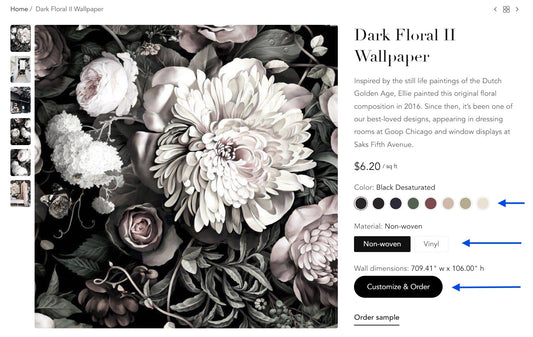
Step 1 - Select Color and Material
Choose your wallcovering color and material. We recommend non-woven for homes and vinyl for commercial spaces.
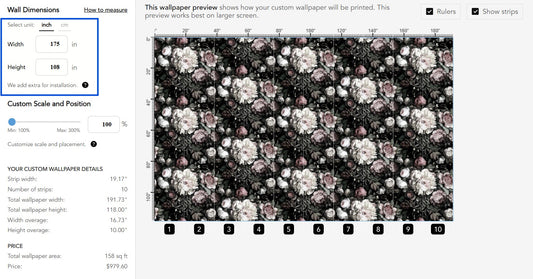
Step 2 - Enter your Wall Dimensions
Input your wall’s width and height, and our Wallpaper Configurator will instantly calculate the required wallpaper strips, measurements, and price.
How to measure?
Our How to Measure page gives measuring instructions for different types of projects such as an accent wall, a ceiling, a staircase, and more.
Built-In Overage
We automatically add 25.4 cm (10") to your width and height measurement to ensure sufficient overage for installation. Additionally, we roundup your width measurement to a multiple of a full strip width, because we can only print a full strip width.
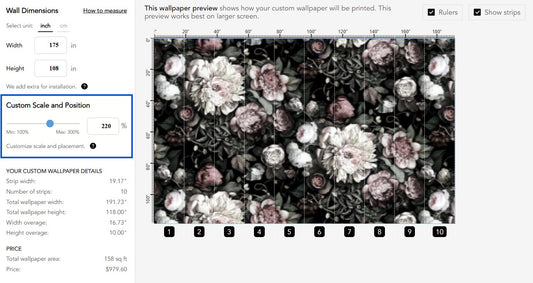
Step 3 - Scale and Position Design
Lastly, you can fully customize the scale and placement of your wallpaper design to perfectly suit your space.
Preview Your Design The on-screen image provides a preview of how the wallpaper will look. While the thumbnail may appear blurry when you increase the scale, rest assured the printed version will be in high resolution and crystal clear.
Custom Scaling Use the scale bar to adjust the size of the design. Please note that not all designs are scalable. If there is no scale bar, the design is only available as pictured.
Adjust Placement Click and drag the design to reposition it exactly how you want it to appear on your wall.
Add to Cart and Checkout
Once you've configured your wallpaper, you're ready to review your order and complete your purchase.
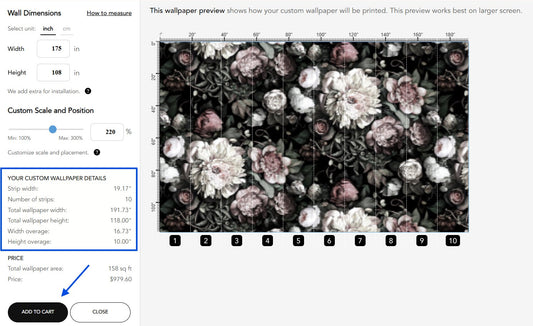
Add to Cart
After you've reviewed your wallpaper quantities in the "Your Custom Wallpaper Details" section, click the Add to Cart button.
If you're ordering for multiple rooms, you should add each room as a separate item in your shopping cart.
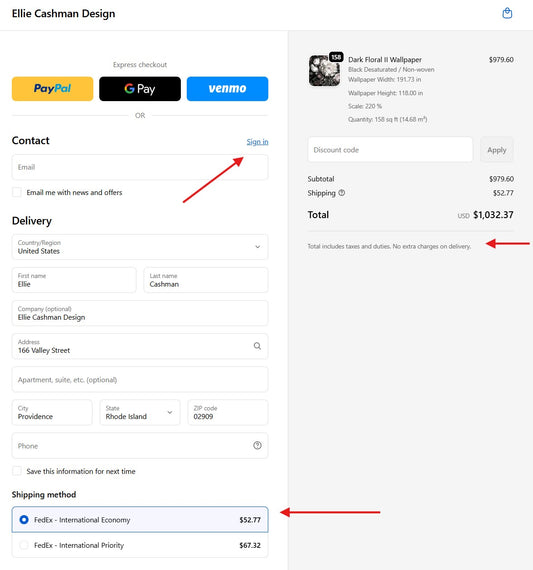
Checkout
After you've entered your address information (or logged in to your account), and you've selected the shipping method, you'll see the total price including shipping.
Depending on your country, applicable duties, tariffs or taxes will be specified. For most countries (including US, UK, CA, EU, AU, NZ), there won't be any additional charges upon delivery.
What happens next?
The following happens after you've placed the order:
- Order Confirmation You'll receive an email confirmation with your order details, including the design, color, material, and exact wallpaper dimensions.
- Production Your wallpaper is custom-printed to your specifications. Most orders are ready to ship within 3–5 business days.
- Shipping Once shipped, you'll receive tracking information from the carrier (FedEx, DHL, etc.) with your estimated delivery date. Most US customers receive their order within 1 - 2 weeks.
- Installation Your wallpaper arrives with numbered strips for easy installation. Visit our How to Install Wallpaper guide for step-by-step instructions and video tutorials.
Frequently Asked Questions
How long does custom wallpaper take to arrive?
Most orders ship within 3 - 5 business days. We ship worldwide. US customers typically receive their wallpaper within 1 - 2 weeks. For planning purposes, we recommend allowing up to 3 weeks.
How much extra wallpaper is included in my order?
We automatically add 25.4 cm (10") to your width and height measurements to ensure sufficient overage for installation trimming. We also round up your width to a full strip width, since we can only print complete strips.
How do I order wallpaper for unconnected areas?
Order each unconnected area as a separate item in your cart. For example, if you're wallpapering different rooms, add each room separately. If you're covering both walls and a ceiling in the same space, order them as separate items so the pattern alignment is optimized for each surface. For more details, see How to Measure for Wallpaper.
Will I have to pay customs fees or duties?
For most countries (including US, UK, CA, EU, AU, NZ), there won't be any additional charges upon delivery. Applicable duties, tariffs, or taxes are specified at checkout.
Why does the preview in the Wallpaper Configurator look blurry when I increase the scale?
The on-screen thumbnail may appear blurry at larger scales, but rest assured - the printed wallpaper will be high resolution and crystal clear.

Need Assistance?
Have questions about our wallcovering materials or need guidance for your project? Our team is here to help. Contact us for expert advice on selecting the perfect wallpaper for your space.